Showing posts sorted by relevance for query typing. Sort by date Show all posts

Saturday, December 11, 2021

A keyboard is a keyboard..........but is it?


As frequent readers of my blog, you know my interest in contesting, and specifically CW contesting. Just a few weeks ago, for the first time, I called CQ in a contest and was running for the entire contest. I had a great time and also a time of growing. As with all bloggers, we have different keyboarding levels. To be a blogger, you have to be somewhat of a typist. There are single finger, two-finger and home row typists. There is a saying "mom knows best" and well in grade 7 I was not so sure about that saying. You see, I had what was called in school a spare period. It was a time slot with no class, and really it was my first one ever, and I planned it as a rest time. Well, mom knows best, and she had to sign off on my spare period and well she had other plans for me. 

She looked at my school timetable and the available classes for my so-called spare period. She found a class that fit right into the spare period time slot..........TYPING.....yup that's right typing! With my mom it's not a suggestion.....it's "your taking typing, and you will end up thanking me for it one day" I went to school in the '70s, and you know how many guys were in typing class.........ME! 

In I went and well there was a positive note and that is it was a great place to meet girls anyway I digress.  The first thing I noticed was you can't look at the keyboard to find the letters as there were no letters to be found, the keyboard was blank. To make a long story short I learned about something called home row and I can still hear the teacher calling out "AAA   BBB    EEE" and so on. I have to admit that yes, mom knows best, and I took 2 semesters of typing class. It made my university years way easier for term papers and so on. 

Fast forward to now......getting a blog post together runs along very smoothly, BUT who would have thunk that my CW contest would benefit as well? I found that when I was running in a CW contest, having the ability to not look down at the keyboard was a bonus. I can hear the calls or exchange and just look at the PC screen and enter the information. 

Here is the catch........ I can type, and my speed is ok for blogging, but typing a call sign and then an exchange at 25-34 WPM takes practice. In the past I felt keyboard was a  keyboard right ?? Well, I found over time, frustration and trial and error that all keyboards for contesting anyway are not alike. 


The keyboard of choice for the longest time was the wireless Logitech k830. It was a smaller keyboard that had a mouse pad. The keys had a soft touch, meaning not much pressure was needed when typing. Also, the keys were close together therefore no ambidextrous finger moves to hit certain letters were needed. 

When practicing with this keyboard for CW contest call sign copying at slower speeds it was good but up around 25 WPM, I found myself hitting two keys at once a lot. At 25 WPM when this happens you lose track of the next letters coming at you, and it can get frustrating.  The Logitech keyboard is not going to cut it. 

I went through my PC junk box and found a keyboard called Adesso this was a small keyboard as well, but with much firmer keys that were raised a bit higher than the Logitech keyboard. I gave this one a go and yes I was not hitting two letters at once but when the CW speed increased again there were issues but again. With firmer keys, I needed to give an extra effort to press each key and at higher CW speeds it just took too much time to enter the needed info from a contact. Once you miss a letter, your concentration is removed from the CW program and  to the keyboard and hence calls and exchanges are missed. 

I have heard it said that most times the solution is right under your nose, and you just can't see it. This was the case with the perfect keyboard. My wife was working from home during the height of the pandemic, and for some time that has not been the case. Her company PC has sat ideal at home for some time now along with a KEYBOARD! It was a full size keyboard, much different from my other go-to keyboards, but I thought I would give it a go. This keyboard is a Lenovo Pro 2 and when she requires it again I have already scoped them out online. I am thinking I will purchase one as a New Years gift for myself. 


I have been using it for about 2 weeks now, and it's amazing, the keys are the right height and key sensitivity is spot on as well. Not only that, but I am having no issues copying calls and exchanges around 33-35 wpm.  So no, a keyboard is a keyboard is not true. I found that it's a personal thing and once you get the right keyboard for you, it sure can make a differance ....in contesting anyway. 


Saturday, June 4, 2022

Listen with your eyes closed.


Way back in high school one of my classes was band class, now this was not brass band but strings and wood wind. I was a cello player and very much enjoyed it but when it was time to sign it out to practice at home I had wished I picked the flute....I digress....What does the cello have to do with ham radio? Well back when I was in band class part of our testing was to listen to a recording of an orchestra playing and identify as many individual instruments as we could. Simple with violin, double bass, cello and clarinet. But the Oboe, Bass and E-flat Clarinet, Bassoon, Contrabassoon and then the Viola. Our teacher told us to close our eyes as we listened and it would make things much easier and over time it did. 

So you ask again what does this have to do with radio? For the past 6 months I have been on a mission to build up my copy speed of Morse code. I really did not like the code and had to learn it and I say "had too" because when I first went for my ham ticket the code was a requirement. I learned the code back then to later forget it once I obtained my ticket. 

I have come full circle to respecting and admiring the skill of Morse code. I worked very hard to learn the code and it's very true if you don't use it you loose it. I had lost it over time but in my mid 50's I started again to learn it and wanted to master it....have not got there yet but the challenge keeps me sharp. 

I am focusing on contest Morse code and my next challenge will be a higher speed QSO Morse code. I am at the point now (35-38 wpm contest code) that as my practice contest code programs spill the code at me I find myself typing the letter or number and looking at the screen on the PC to see if it's correct and then listen for the next letter. At 36-38 wpm looking at the letter to confirm is not an option I end up missing letters and not getting the call sign or exchange correct. 

Now at this speed of code I strongly recommend proper home row touch keyboarding and not hunt and peck the letters and numbers. As mentioned in a past post thank goodness in school I took typing and am able to touch type. As I struggled to hit the 35-38 wpm mark I remembered my music teacher...."close your eyes and listen" I did just that and my rate of copy went from 70% up to the 90's. I don't keep my eyes closed all the time and I feel it's just really helping me to concentrate on the rhythm of the letters and numbers. 

To close your eyes and listen sure does the trick for me.

Thursday, March 14, 2013

K1EL WKUSB keyer

About a month ago a new kit arrived and is still sitting waiting to be built. With some thought and over time I ended up selling my Logikit CMOS4 keyer that I built. I sold it not because it's a poor keyer but  being a stand alone keyer made it for me a hassle to program.  I missed just starting up the PC opening a program typing in what I wanted the keyer do and simply saving that sequence.  I do a lot of CW contests and have to keep changing the exchanges. With the CMOS4 keyer I was always taking out the manual and refreshing my poor memory with the proper sequence of buttons to push on the keyer to enter and save morse code in the CMOS 4 memory.
So I sold the Logikit keyer CMOS4 and Julie had purchased me the K1EL WKUSB keyer kit. I am familiar with the WKUSB keyer as some years ago I did purchase a built unit and it worked great. At the time it did seem to have some issues with my contest program N1MM. I ended up selling the unit and as they say hind sight is 20/20 and if I knew then what I do now I would still have it. This keyer has been around for some time now and improvements have been made. To hook it up to the PC is a simple USB cable along with some software and you are off to the races. To change the CW messages you open a program on your PC enter your new message then save to the key and that's it. You are able to enter four separate messages (just great for contests or DXepedtion contacts) The keyer can be connected to two rigs, my K3 and K2 can use the same unit without cable swapping. So back to the software for just one more moment.....not only can you program messages BUT there is a slew of custom settings you can enter such as spacing, weight and tone just to mention a very few extras. I hope this weekend to heat up the soldering iron and point it in the direction of this kit!!

Wednesday, December 30, 2015

2016 dreams.......I mean goals.

2015 is ending and soon it's going to be 2016 before you know it! In the past I have made New Years resolutions some very ambitious and short lived and other I still hold to today. As I age I realize more and more the most important thing is your health. One of the areas of your health that affects a whole lot of areas is your weight. I would be happy to loose about 20 lbs or so and that for sure would help me out in the long run. With regards to ham radio in the past I have made New Years goals of improving my CW speed, getting on the air more, trying new modes and so on. For some reason I fall into the same old same old, not finding the time to see these goals to reality. It seems these days it's all about finding the time or should I say setting the time aside to achieve the goals you set for yourself. Time has always been my problem as it seems you are pulled in many directions. Maybe it's about multi tasking.......at this moment I am typing this post and I have the rig on listing to CW and checking the P3 band scope for any activity. The post may take a bit longer (there is that time thing again) but I am able to get some radio time in and accomplish a blog post as well. This brings me back around to the start of my post....am I going to make any resolutions for  2016?? Of coarse I am.........for the hobby I would like to try to keep this multi tasking thing going it seems to be working for me so what the heck. Maybe I can get more posts out and improve my on air time. Personally I would like to eat better, drops some pounds and fit in some more activity. Happy New Year to all my readers and all the best in the coming new year.

Thursday, December 16, 2021

Practice practice and more practice.


 Moving along with my contest code...I call it contest code as it's really not conversation code as that takes a bit more skill. Not saying that contest code does not take skill but you kinda have an idea with contest code what to expect.........a call sign, a number or in some instances a name. Conversational code is more whatever the heck you both are going to talk about. Now mind you the RST, name, QTH and WX are kinda standard it's when the op deviates from the plan and gets going on about the vacation his family took in your hometown.......I digress. 

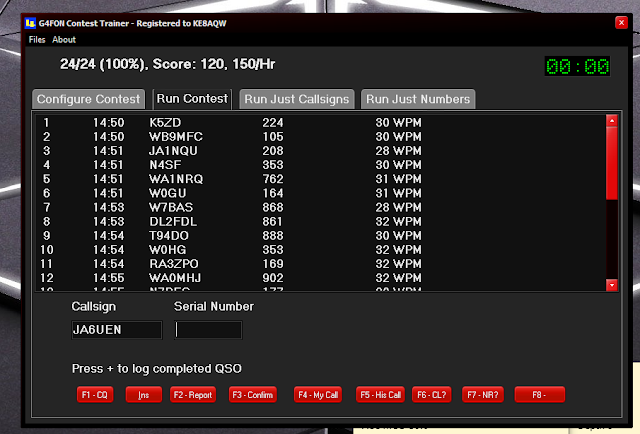
I have been trying to build on my contest CW speed, accuracy and most of all confidence. I have been doing that with these programs G4FON cw traner, RufzXP, Morse Runner and LCWO code practice programs. What I have found is you have good days and you have not-so-good days. There was a practice session when I would hear the code and freeze wondering for some crazy reason what that letter was. Then the mixing up of letters on the keyboard, going to a "G" but end up typing an "H". Oh and then a big confidence builder is when the contest program send you "SH5IH" 

The most recent issue I was having was hitting between the letters on the keyboard and gong for letters on the 3rd row up such as "W, T or Y" but hitting the numbers above those letters.  I finally figured out what the issue was. Seems when I was practicing on my Mac laptop the keys are closer together than on my Lenovo keyboard. I was doing twice as much practicing on my Mac laptop and my fingers were trained to only move slightly on the keyboard. This meant issues on the larger Lenovo keyboard. The solution was to bring the Lenovo keyboard to the make and use that. 

Anyway today I was thrilled to get zero mistakes on the G4FON CW contest trainer today......I know I know I am all ready for the big ego bubble burst the next session when missing more than I copy. But so goes the contest CW battle. For now, I am bathing in the success! 

This weekend is the annual running of the RAC Canada Winter contest and I am entering the CW only category and yes you guessed it I am going to be calling CQ..........unless I see a nice RAC multiplier worth 20 points!! 


Saturday, November 13, 2010

Kit building...the way you start determines your successful end

How most kits arrive
How it all begins
In my years of kit building I have had my share of blunders....but I have learned from them. To me the most important part to kit building is the start. We all have ordered a kit and waited and waited and WAITED for it to arrive. When it does arrive in the past I would just DIVE RIGHT IN and start building to get it up and working.  Many times the kit did not work and in some cases there was smoke !!!!.  I have learned  that the way you start a kit gauges your success. Hmmm you say...."don't you just start  building the kit" well here is how I start a kit see if you do the same ?.... When a kit arrives I am just like anyone else I am thrilled it finally has gotten here. For a week or so I have been typing the tracking number into the Post office's web page to see where it is. I have already downloaded the PDF manual and almost memorized it. When it arrives and I get the kit into the shack it's so hard to just not open the box turn on the soldering iron and get going......but WAIT.... that is not the type of start I have learned that works for me and I say LEARNED because I have had some major screw up's by just opening a kit and solder solder solder until it was done.
When a kit arrives this is the way I start.....
.
labeling bags
Most if not all manuals have a parts list and yes ALL manuals say CHECK THE PARTS!!!!
1) I take the time to check  ALL parts. When I say check, I check ALL resistor and capacitor values with a meter. The inductors I check the banded color codes as the value can vary with frequency.
2) I then check part numbers  and compare that to the manual. So diodes, transistors, IC's, crystals, relays, knobs, thermal pads, screws, standoff's .....you get the idea.
Checked parts

3) Each part or group of the same parts go into a zip lock bag with a stick on label. Static sensitive parts stay in their bags and a label goes on that bag.  The label may consist of the value such as it's resistance or capacitance,  part number, a description and if more than one of the same part (screws, resistors) the label will have the total amount as well.  All resistors, capacitors, inductors and hardware etc go into their own larger bag labeled hardware, resistors....etc When each part comes out of the zip lock bag the value or part number is checked again, the amount on the label is decreased (if there are more than one of the same part in the bag)
Wire and cable bag

When the above steps are done the kit building begins......Why do I do it this way......
1) The kit building process is rarely interrupted, a missing part can be sent to me and most times that part when needed arrives in time. Instead of getting to that point in the build and waiting for the part to come. Also some part numbers do not match the parts list. Most times it is the same part but due to availability limitations  another manufacture was used. I still email the kit company. Again I don't have to stop the build to check.
2) Checking each part gets me familiar with all the parts.  I have found very subtle differences with some parts. A mistake of soldering the wrong part in a slot is very difficult I find if I follow this process.
3) The work place is kept very neat with the larger kits this is very important as parts can get dropped and lost. I generally start out with about four large bags each containing smaller bags of hardware, resistors, inductors and capacitors etc.
4) This is the last and most important tip....these steps do take time and my XYL see's this as time spent building and not buying more kits.

Sunday, October 2, 2011

ARRL disappointment followup

In my last post regarding the ARRL and my disillusion of their discontinuing of most online courses I did not want to leave things on a negative note. We can complain about something each and every day but for me it's not about the complaining it's the solutions that matter. I turned to the internet to see what was out there regarding any online anything for Amateur radio!!! At Google typing in "online ham radio courses" netted my LOTS of study guides on how to become a radio amateur. As I weeded through the  many many many hits I came across some gem's. No they are not full fledged....the real deal.....online courses I was looking for but very good none the less.

Monday, March 15, 2021

QSO Today Virtual Ham expo.....how did it go?

 I was very much looking forward to the Virtual Ham Expo this past weekend. My wife and I were going to be away at a hotel for the weekend, a mini getaway. I took my Mac laptop along for the ride as I wanted to check in on the Expo in the evenings. When I tried to log in things did not work out as planned apparently I had to generate an "E-ticket". Not a problem so I clicked on the link and then was asked for my callsign, email address and then the problem my "order number"? About a 1/2 hour later I found the order number but I could not get the form to accept my order number. Over the weekend I tried several times but could not get my number accepted.  

I was reading online of other ops who were having issues as well. Below is some of the feedback that was being posted. 

- Issues gaining access to Virtual Ham expo 

- Issues with Airmeet video 

- Lobbies and Exhibition tabs were just blank.

- Live help was just a chatbot and you were forced to email and wait for an answer. 

There are many more issues that are listed in chat forums but this was a huge undertaking and with all things hiccups happen. 

As I was typing this post-Eric Guth 4Z1UG sent out the below via email: 

Dear Mike,


First of all, I would like to apologize for the poor experience that many of you had at the QSO Today Virtual Ham Expo.  After our very successful August 2020 Expo, I had a vision of combining what I loved about the vFairs platform (which is what we used last time) with a new technology that would provide a lot more interaction between attendees, speakers, and exhibitors.  


Unfortunately, we had many technical issues with the Airmeet Presentations and the integration of the vFairs and Airmeet platforms.  My brilliant programmer offered his resignation and to return his salary.  Ridiculous, as the failure of this project was mine alone.  I am deeply sorry for letting you down.


Fortunately for all of us, we had all the video presentations pre-recorded in the event of a technical disaster.  Therefore, all of the presentations that were to take place over the weekend are now in the final editing stages and will be available in the Expo Auditorium within 48 hours.  These videos are in glorious 1080P, high resolution, and streaming from Vimeo (a proven and strong video platform).  All of the 80+ speakers gave fantastic presentations.  


Please don’t let the last couple of days get in the way of watching our amazing speakers.  If you are blind or vision impaired, know that we have a solution for you at the qsotodayhamexpo.com website. Give us a day or two to make that preparation. 


To get to the on-demand site, simply click on the following link:  https://qsotoday.vfairs.com.  Use your email address to get in (the one you used to purchase your ticket).  No password is required.  Go into the lobby and click on the Auditorium door, or click Auditorium on the main navigation bar at the top.   If you have any problem with access, and you had a ticket, let us know immediately by sending an email to rachel@qsotodayhamexpo.com for us to update the attendee list, keeping in mind that we are two hours ahead of UTC.  Again, we will need about 48 hours to get all the videos up and ready.  Note that while the vFairs platform at the above link will be open during the on-demand period through April 12, 2021, the Airmeet Lounge is now closed.


One of the things that we’ve stressed in all of our communications is that the QSO Today Virtual Ham Expo team is committed to constantly learning and improving what we do. Virtual conventions of this magnitude are new territory. We believe that there’s a place for a virtual ham Expo to serve the needs of the very large amateur radio community, especially those that don’t attend in-person national or regional events (or even local events).  We are committed to making that happen.  Our first Expo was a great success, our second one not so much.  Setbacks happen but it’s important to keep moving forward.  As such, we are committed to getting “back on that horse”, learning from our mistakes, and making sure that the next one is back on track.  Please stay patient with us and we’ll prove it to you.  


As always, I can be reached at eric@qsotodayhamexpo.com.


The QSO Today Virtual Ham Expo will return on August 14th and 15th. 


Humbly yours and 73,


Eric Guth, 4Z1UG


Eric is taking responsibility for this and I for one will cut him some slack, after all, it's a huge undertaking and expectations were high. To me, he sounds very sorry and upset about how the event turned out. We all learn from our mistakes and I for one have made lots of them.